
Features / File transfer, network playback and offline use
File transfer and
network playback
Transfer files through a computer browser, play video and audio directly from your home NAS, or save them to your device for offline use.
iPhone · iPad · Duo inner and outer displays
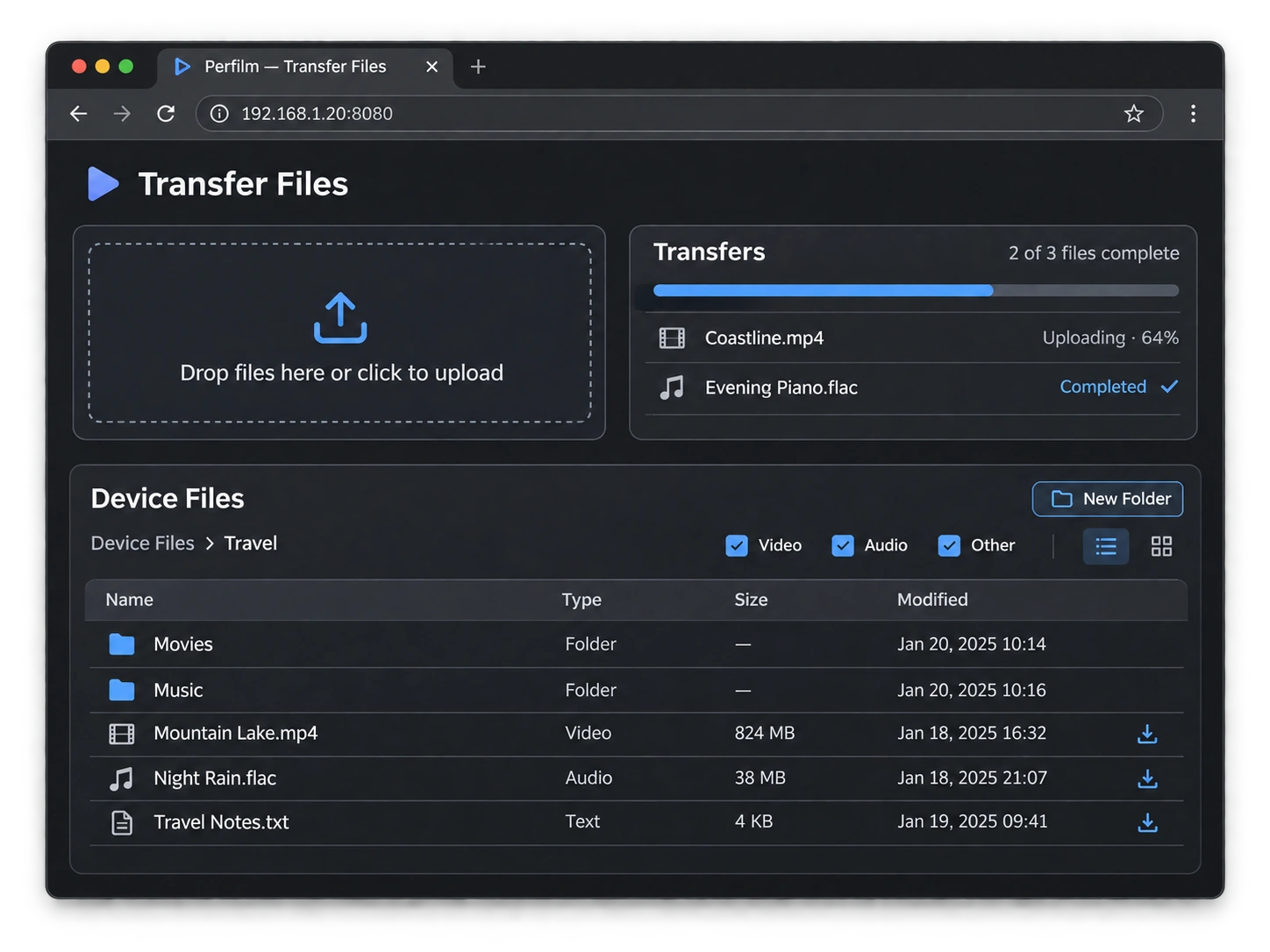
File transfer
Connect your phone and computer to the same local network, then turn on local network transfer in Perfilm’s Browse tab. Enter the displayed address in your computer’s browser to access device files without installing a desktop client.
Upload files and folders
Choose files in the upload area or drag files and whole folders into the browser. Folder uploads preserve the folder structure.
Choose an upload folder
Open the destination folder in the browser before uploading. Navigating to another folder does not change the destination of uploads already started.
Transfer progress
View overall progress and each file’s status, cancel a task or retry a failed upload from the same task.
Download to your computer
Browse device files and use a file’s download button to save video, audio or other files to your computer.
Browse and filter folders
Browse with folder navigation, list or grid views, filter by type and sort by name, type, size or modification date.
Create folders and delete files
Create folders or delete files and folders in the browser. Deletion requires confirmation; deleting a folder includes its contents.
Keep Perfilm in the foreground during transfers. After quitting the app, turn local network transfer on again for the next session.
Network playback
Access your home NAS or a supported file server using SMB and other supported local network protocols. Browse video and audio, play directly or download files to your device first.
Connect to a server
Choose a discovered local device in Browse, or add a server manually with its address and any required account details.
Play directly
Open video or audio from a server folder without downloading the whole file first. Playback requires a network connection and an accessible server.
Save frequent connections
Add servers to favorites and return to them from Browse to continue browsing their folders.
Download to your device
Download video or audio to a local folder. Once downloaded, use it as a local file without staying connected to the NAS.
Offline use
Save movies, series, music or audiobooks before leaving. On flights, boats or journeys with an unreliable signal, play local files without a NAS or network connection.
- Prepare files in advance
- Upload through a computer browser, download from a NAS or import with the Files app. Check that files are fully saved before going offline.
- Play local media
- Open files in video or audio folders and use seeking, playback speed, audio tracks, subtitles and other relevant controls. Video playback · Audio playback
- Save accompanying subtitles
- Import or download external subtitles before leaving too. Embedded subtitles and subtitles already saved to your device remain available offline.
- Organize folders
- Organize files by trip, series or album using local folders. Before leaving, disconnect from the network and check that the files you need play correctly.
Download Perfilm
For iPhone and iPad